
Available Network Architecture#
Brief Introduction of the DynapCNN Core#
Our devkit has 9 DynapCNN Cores, each core can executes Asynchronous Convolution.
Each core also have the following features:
Each core has an unique index number, the first core’s index starts from 0. So the index is in range [0, 8).
Each core can only define 2 destination cores as its output destination core(layer). See detail.
You can define multiple cores to have one same destination core. Technically,you can use this feature to achieve a
short-cut(residual connection) like ResNet does. See detail.Each core can optionally apply a
sum-poolingoperation before feeding the output events into the destination core. See detail.Each core can optionally apply a
channel-shiftoperation before feeding the output events into the destination core. Technically, you can use this feature toconcatenatetwo cores’ output events among the channel axis. See detail.You can define the order of cores/layers by defining the
destinationindex of each core, i.e. the order of the 9 layers on the chip can be customized by yourself. We already have this feature in sinabs-dynapcnn. When you deploy an SNN to the devkit, you can do:
from sinabs.backend.dynapcnn import DynapcnnNetwork

# suppose snn is a 4-layers network
dynapcnn = DynapcnnNetwork(snn=snn, discretize=True, dvs_input=False, input_shape=input_shape)
# deploy the SNN
dynapcnn.to(devcie="your device", chip_layers_ordering="auto")
# or you can do
dynapcnn.to(devcie="your device", chip_layers_ordering=[0, 1, 2, 3])
# or
dynapcnn.to(devcie="your device", chip_layers_ordering=[2, 5, 7, 1])
What network structure can I define?#
Sinabs can parse a torch.nn.Sequential like architecture, so it is recommended to use a Sequential like network.
As of v3.1.0, we released a network graph extraction feature that helps users deploy their networks with more complex architectures into the devkit.
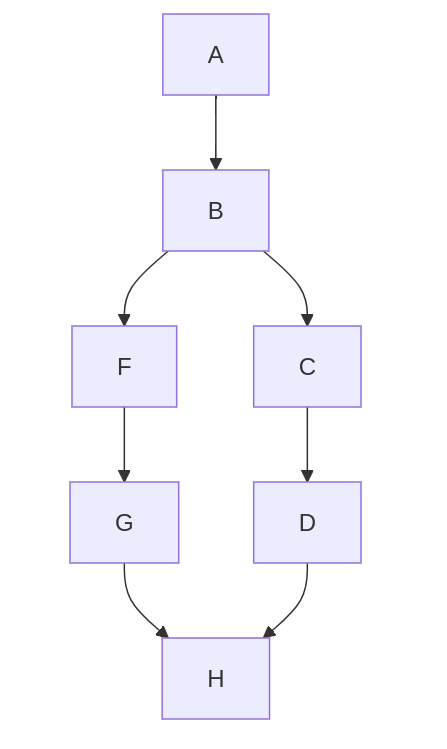
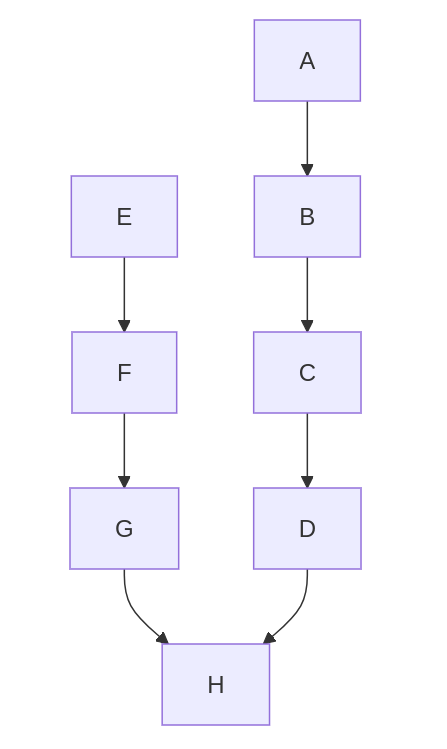
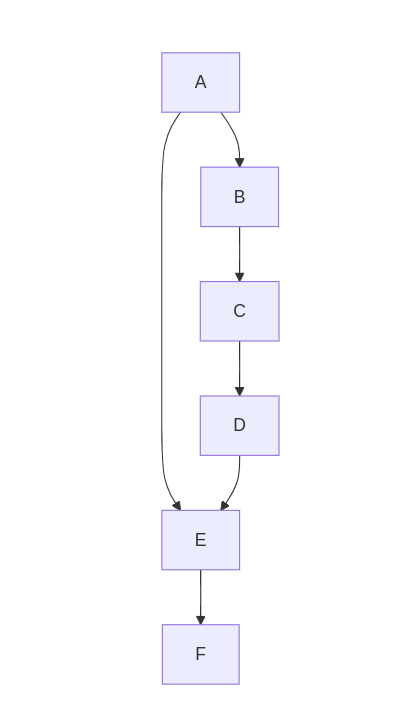
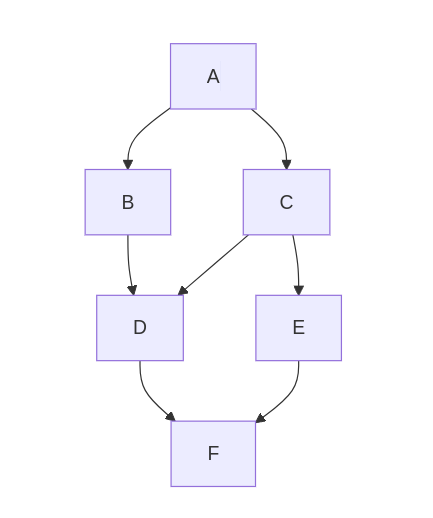
Our Speck chip, in fact, supports branched architectures. With the graph extraction feature, we support a range of network structures, as shown below:
A network with a merge and a split:
Two networks with merging outputs:
A network with residual connections:
A more complex network:
Note: with the graph extracture feature it is possible to implement recurrent neural networks. However, this is not recommended or supported as it can result in deadlock on the chip.
Note2: the use of two parallel network although supported by our chip was not fully considered in our sinabs implementation.
How to make use of the graph extraction feature?#
For general architectures, users need to define their classes, by defining at least the __init__ method with all the layers, as well as an appropriate forward method.
Here is an example to define a network with a merge and a split:
import torch
import torch.nn as nn

from sinabs.activation.surrogate_gradient_fn import PeriodicExponential
from sinabs.layers import IAFSqueeze, Merge, SumPool2d


class SNN(nn.Module):
    def __init__(self, batch_size) -> None:
        super().__init__()
        # -- graph node A --
        self.conv_A = nn.Conv2d(2, 4, 2, 1, bias=False)
        self.iaf_A = IAFSqueeze(
            batch_size=batch_size,
            min_v_mem=-1.0,
            spike_threshold=1.0,
            surrogate_grad_fn=PeriodicExponential(),
        )
        # -- graph node B --
        self.conv_B = nn.Conv2d(4, 4, 2, 1, bias=False)
        self.iaf2_B = IAFSqueeze(
            batch_size=batch_size,
            min_v_mem=-1.0,
            spike_threshold=1.0,
            surrogate_grad_fn=PeriodicExponential(),
        )
        self.pool_B = SumPool2d(2, 2)
        # -- graph node C --
        self.conv_C = nn.Conv2d(4, 4, 2, 1, bias=False)
        self.iaf_C = IAFSqueeze(
            batch_size=batch_size,
            min_v_mem=-1.0,
            spike_threshold=1.0,
            surrogate_grad_fn=PeriodicExponential(),
        )
        self.pool_C = SumPool2d(2, 2)
        # -- graph node D --
        self.conv_D = nn.Conv2d(4, 4, 2, 1, bias=False)
        self.iaf_D = IAFSqueeze(
            batch_size=batch_size,
            min_v_mem=-1.0,
            spike_threshold=1.0,
            surrogate_grad_fn=PeriodicExponential(),
        )
        # -- graph node E --
        self.conv_E = nn.Conv2d(4, 4, 2, 1, bias=False)
        self.iaf3_E = IAFSqueeze(
            batch_size=batch_size,
            min_v_mem=-1.0,
            spike_threshold=1.0,
            surrogate_grad_fn=PeriodicExponential(),
        )
        self.pool_E = SumPool2d(2, 2)
        # -- graph node F --
        self.conv_F = nn.Conv2d(4, 4, 2, 1, bias=False)
        self.iaf_F = IAFSqueeze(
            batch_size=batch_size,
            min_v_mem=-1.0,
            spike_threshold=1.0,
            surrogate_grad_fn=PeriodicExponential(),
        )
        # -- graph node G --
        self.fc3 = nn.Linear(144, 10, bias=False)
        self.iaf3_fc = IAFSqueeze(
            batch_size=batch_size,
            min_v_mem=-1.0,
            spike_threshold=1.0,
            surrogate_grad_fn=PeriodicExponential(),
        )

        # -- merges --
        self.merge1 = Merge()

        # -- falts --
        self.flat_D = nn.Flatten()
        self.flat_F = nn.Flatten()

    def forward(self, x):
        # conv 1 - A/0
        convA_out = self.conv_A(x)
        iaf_A_out = self.iaf_A(convA_out)

        # conv 2 - B/1
        conv_B_out = self.conv_B(iaf_A_out)
        iaf_B_out = self.iaf2_B(conv_B_out)
        pool_B_out = self.pool_B(iaf_B_out)

        # conv 3 - C/2
        conv_C_out = self.conv_C(pool_B_out)
        iaf_C_out = self.iaf_C(conv_C_out)
        pool_C_out = self.pool_C(iaf_C_out)

        # conv 4 - D/4
        conv_D_out = self.conv_D(pool_C_out)
        iaf_D_out = self.iaf_D(conv_D_out)
        # fc 1 - E/3
        conv_E_out = self.conv_E(pool_B_out)
        iaf3_E_out = self.iaf3_E(conv_E_out)
        pool_E_out = self.pool_E(iaf3_E_out)

        # fc 2 - F/6
        conv_F_out = self.conv_F(pool_E_out)
        iaf_F_out = self.iaf_F(conv_F_out)

        # fc 2 - G/5
        flat_D_out = self.flat_D(iaf_D_out)
        flat_F_out = self.flat_F(iaf_F_out)

        merge1_out = self.merge1(flat_D_out, flat_F_out)
        fc3_out = self.fc3(merge1_out)
        iaf3_fc_out = self.iaf3_fc(fc3_out)

        return iaf3_fc_out
Can I achieve a “Residual Connection” like ResNet does?#
Like mentioned above, “Yes, we can define a residual short-cut on the devkit”. You can manually
change the samna.speck2f.configuration.CNNLayerDestination.layer to achieve this, if you are very
familiar with the samna-configuration.
You can also make use of our network graph extraction feature, to implement residual networks.
How can I define “Residual Connection” manually?#
You can also achieve “Residual Connection” by manually modify the samna-configuration.
Let’s say you want an architecture like below:
from torch import nn
from sinabs.layers import IAFSqueeze


class ResidualBlock(nn.Module):

    def __init__(self):

        super(ResidualBlock, self).__init__()
        self.conv1 = nn.Conv2d(1, 2, kernel_size=(1, 1), bias=False)
        self.iaf1 = IAFSqueeze(batch_size=1, min_v_mem=-1.0)

        self.conv2 = nn.Conv2d(2, 2, kernel_size=(1, 1), bias=False)
        self.iaf2 = IAFSqueeze(batch_size=1, min_v_mem=-1.0)

        self.conv3 = nn.Conv2d(2, 4, kernel_size=(1, 1), bias=False)
        self.iaf3 = IAFSqueeze(batch_size=1, min_v_mem=-1.0)

    def forward(self, x):

        tmp = self.conv1(x)
        tmp = self.iaf1(tmp)
        out = self.conv2(tmp)
        out = self.iaf2(tmp)
        # residual connection
        out += tmp
        out = self.conv3(out)
        out = self.iaf3(out)

        return out
You can write it like:
# define a Sequential first
SNN = nn.Sequential(

    nn.Conv2d(1, 2, kernel_size=(1, 1), bias=False),
    IAFSqueeze(batch_size=1, min_v_mem=-1.0),

    nn.Conv2d(2, 2, kernel_size=(1, 1), bias=False),
    IAFSqueeze(batch_size=1, min_v_mem=-1.0),

    nn.Conv2d(2, 4, kernel_size=(1, 1), bias=False),
    IAFSqueeze(batch_size=1, min_v_mem=-1.0),
)

# make samna configuration
dynapcnn = DynapcnnNetwork(snn=SNN, input_shape=(1, 16, 16), dvs_input=False)
samna_cfg = dynapcnn.make_config(device="speck2fmodule")

# samna_cfg.cnn_layers[layer].destinations[0] stores each core's first destination layers configuration
# check the default layer ordering
for layer in [0, 1, 2]:
    print(f"Is layer {layer} output turned on: {samna_cfg.cnn_layers[layer].destinations[0].enable}")
    print(f"The destination layer of layer {layer} is layer {samna_cfg.cnn_layers[layer].destinations[0].layer}")

# manually modify the samna config
# since 1 DYNAP-CNN core can have 2 destination layer
# we need to enable the core#0's 2nd output destination and target it to core#2
# so we need to modify samna_cfg.cnn_layers[0].destinations[1]

samna_cfg.cnn_layers[0].destinations[1].enable = True
samna_cfg.cnn_layers[0].destinations[1].layer = 2

# by applying the modification above, we not only send the output of core#0 to core#1 but also to core#2.
# which means we achieve the residual block!

# finally we just need to apply the samna configuration to the devkit, we finish the deployment.
devkit = samna.device.open_device("Speck2fModuleDevKit")
devkit.get_model().apply_configuration(samna_cfg)
It is a lot of manual work but it will let you have your Residual Block. We recommend to use our network graph extraction feature for residual connections.
What execution order should I be aware of when I am implementing a sequential structure?#
You should be aware with the internal layer order. DYNAP-CNN techonology defines serveral layers that can be communicates each other. In a layer, the Convolution and Neuron activation must be implemented with an order like:
Conv–> IAF –>pool(optional)
The cascaded convolution and neuron activation in a DYNAPCNN layer is not allowed.
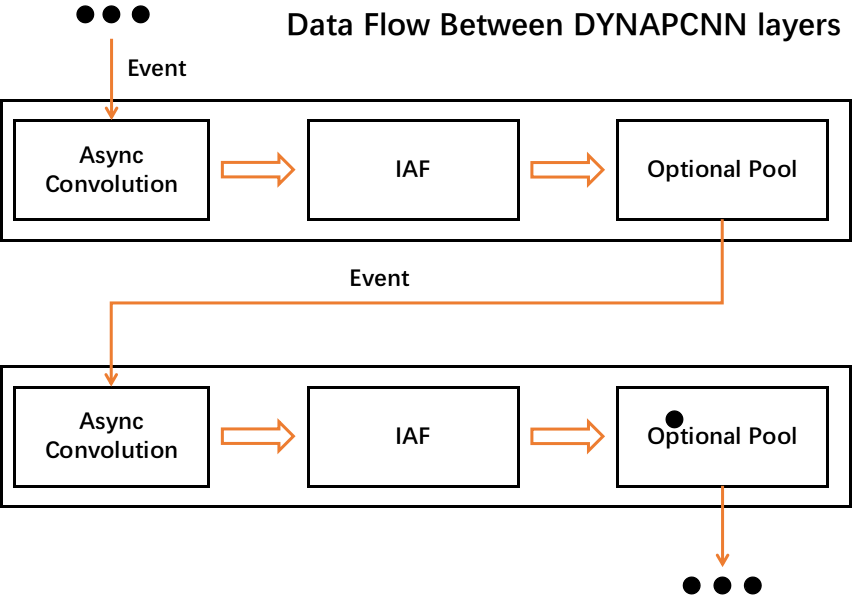
Ex1. Bad Case: Cascaded convolution#
network = nn.sequential([
                        nn.conv2d(),
                        nn.conv2d(),
                        IAFsqueeze(),
                        ])
Ex2. Bad Case: None sequential#
class Network:

    def __init__(self):
        self.conv1 = nn.conv2d()
        self.iaf = IAFsqueeze()
    def forward(self, x):
        out = self.conv1(x)
        out = self.iaf(out)
        return out
Ex3. Bad Case: Use unsupport operation#
network = nn.sequential([
                        nn.conv2d(),
                        nn.BatchNorm2d(), # unsupport in speck
                        IAFsqueeze(),
                        ])
Ex3. Good Case: Use unsupport operation#
network = nn.sequential([
                        nn.conv2d(),
                        IAFsqueeze(),
                        nn.pool(),
                        # up to here is using 1 dynapcnn layer
                        nn.conv2d(),
                        IAFsqueeze(),
                        nn.Flatten(),
                        nn.Linear(),
                        IAFsqueeze(),
                        # up to here is using 2 dynapcnn layer
                        ])
Memory Constrains#
Each core has a different “neuron memory” and “weight memory” constraints in the design. Please be careful about the memory limitations when you design your SNN. See detail in the overview of devkit.
Feature Map Size Constrains#
The maximum output feature map size supported by each core is 64 x 64, while our maximum input shape is 128 x 128. So you need to at least down-sample the input into 64 x 64 by pooling or stride-convolution in the first layer of your model.
Limitation of Using ReadoutLayer#
If you are using readout layer, the number of output class should < 15. See detail in the readout layer introduction.